
ARP 2600 Patch Analysis: Trumpet and French Horn Sounds
How can you create and blend synthetic trumpet and French horn sounds on the ARP 2600 using a sawtooth oscillator, the low-pass filter, ADSR envelope and different audio signal paths?
Learning the ARP 2600 by analysing patches
The ARP 2600 is an iconic synthesizer, and there is no shortage of videos explaining its historical importance or naming famous musicians who used it. In this series, I want to take a different approach: analyse actual patches from the original ARP 2600 Patch Book, published in the early 1970s and reissued as a PDF by Korg in 2020.
Studying a patch is an enjoyable way to learn a synthesizer. It gives us a concrete musical goal, but it also forces us to understand the instrument's signal paths, modulation sources and less obvious interactions.
Our first example is patch number 2, “Trumpet and French Horn.” The original patch uses only one patch cable. More interestingly, as we analyse it, we will discover that even this cable can be removed or replaced by a different signal route.
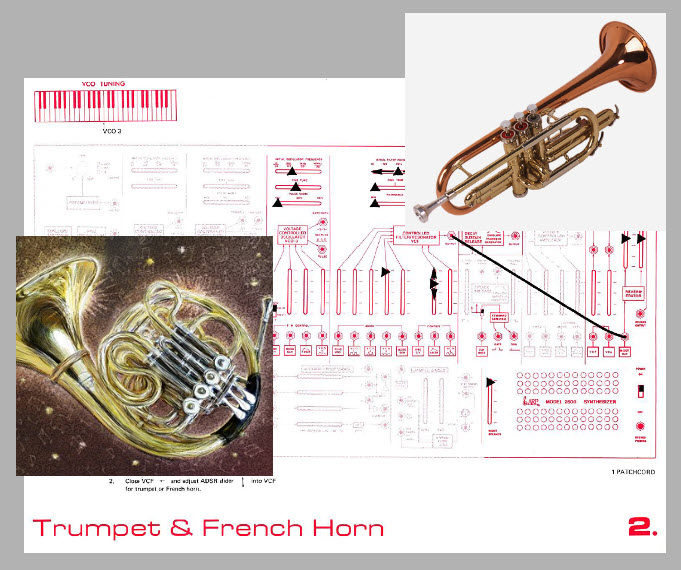
The idea is to create a sound that can move between a synthetic French horn and a blend of French horn and trumpet. The key is not to use two separate oscillators, one for each instrument. Instead, we start with a sawtooth wave and use the filter envelope to change its spectral character.
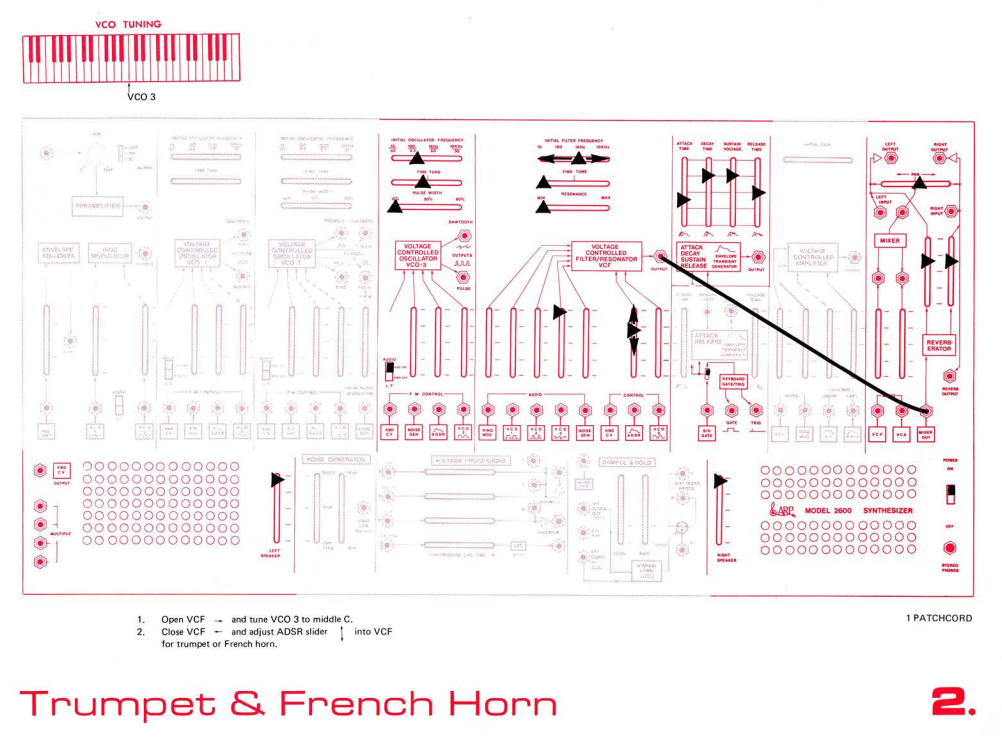
Step 1: Start with a sawtooth wave
Both trumpet-like and French-horn-like synthetic tones can be built from a sawtooth waveform. On the ARP 2600, Oscillator 3 provides a convenient starting point.
Open the oscillator mix in the filter section so that Oscillator 3's sawtooth wave reaches the voltage-controlled filter, or VCF.
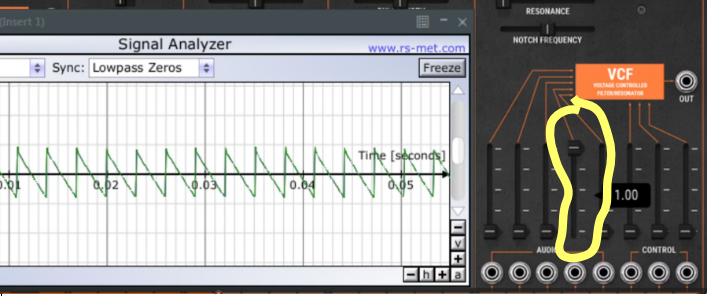
At this stage, it is useful to distinguish between a waveform's spectrum and the complete sound of an instrument. The sawtooth contains a rich set of harmonics, making it a reasonable raw material for a brass-like tone. But a waveform alone does not reproduce the characteristic sound of a trumpet or French horn. The way its spectrum changes over time is also important.
For now, we have the raw material.
Step 2: Understand the output mixer
Before shaping the sound, look at the two sliders in the ARP 2600's output mixer: the VCF and VCA inputs.
In the original patch, the VCA slider is down while the VCF slider is raised. This means that the sound reaches the output mixer through the filter path rather than through the voltage-controlled amplifier.
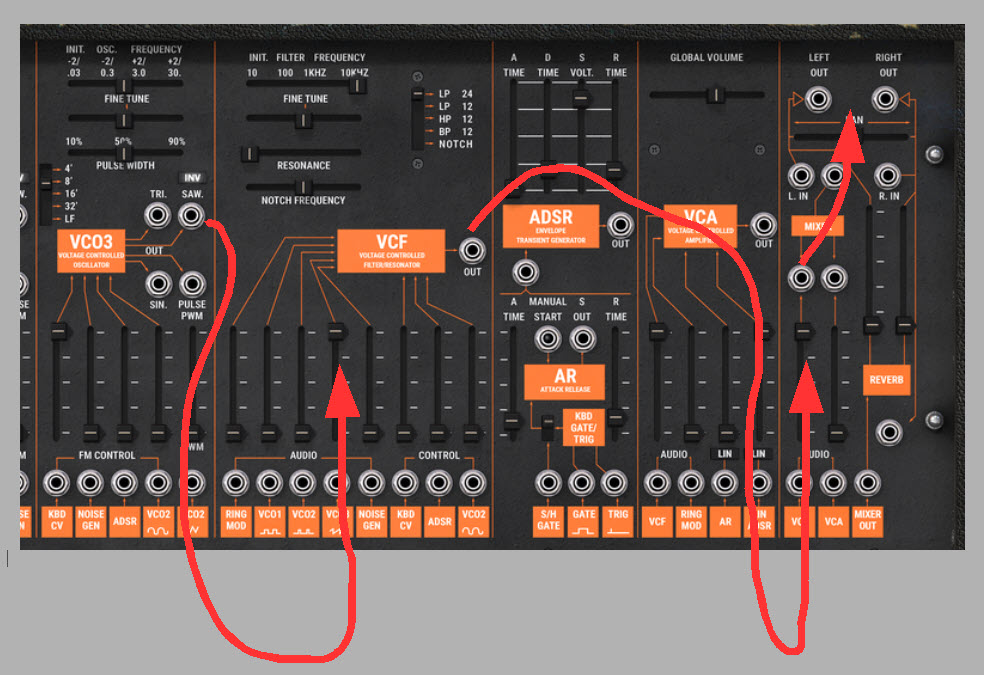
Why does this matter?
A VCA controls the level of the signal passing through it. If we want an envelope to open and close the VCA, the envelope must control the amplifier, and the audio must pass through that amplifier. With the VCA path closed, an envelope applied to the VCA cannot make that path produce sound.
The VCF path provides another possibility. We can let the audio pass through the filter and use an envelope to change the filter's cutoff frequency. This changes the spectrum rather than directly shaping the amplitude at the amplifier.
In this patch, the VCF output is being used to get around the normal VCA route. This is one of the useful lessons of a semi-modular synthesizer: the signal path you hear depends on how you route it, not simply on which modules are present.
Step 3: Create the French horn character
A French-horn-like sound can be approximated by reducing the high-frequency content of the sawtooth wave.
Close the low-pass filter until the sound becomes darker and less bright. In the demonstration, a cutoff setting around 1 kHz with the 24 dB-per-octave low-pass filter gives a satisfactory synthetic French horn.
This is not a universal acoustic specification for a French horn. It is a practical starting point for this particular patch. The result depends on oscillator tuning, filter characteristics and the settings of the rest of the synthesizer.
The principle is straightforward: lowering the low-pass filter's cutoff removes more of the higher-frequency content, making the sound less bright.
At this stage, we have a static approximation of a French-horn-like spectrum. The next step is to make the spectrum change when we play a note.
Step 4: Use the ADSR envelope to shape the filter
The patch uses the ADSR envelope generator to control the VCF cutoff frequency. Its Attack, Decay, Sustain and Release settings determine how the filter opens and closes over the course of a note.
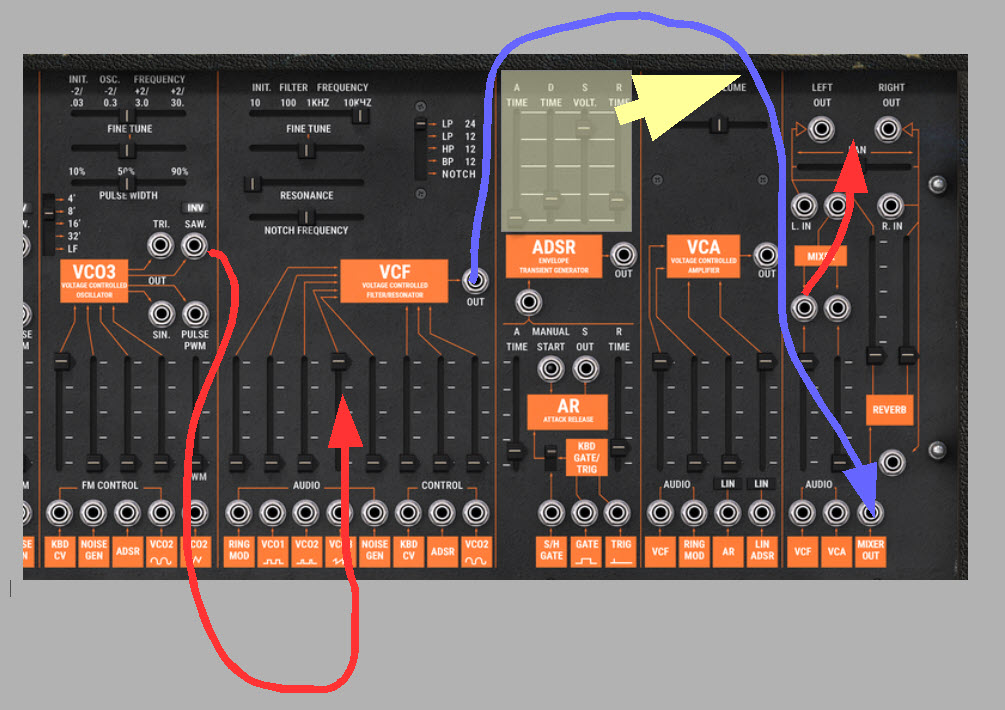
First, lower the VCF slider in the output mixer and raise the ADSR slider in the filter section. Press a key.
You may hear nothing. This is not necessarily a problem with the envelope settings: if both the VCF and VCA paths in the output mixer are closed, neither route is delivering audio to the output.
The original patch contains a useful workaround. The ARP 2600 has a jack labelled MIXER OUT associated with its reverb section. By patching the filter's output directly into this jack and raising the reverb's left and right input sliders, we can hear the filtered signal.
This route bypasses the usual VCA path and the normal output-mixer route. It also means the reverb input sliders affect how much signal reaches the output, so they are doing more than simply determining the amount of reverberation.
Now the filter envelope becomes audible. As the envelope changes the cutoff frequency, the tone becomes brighter or darker over time.
Step 5: Shape the note
To create a sound that responds more convincingly to each keystroke, begin by reducing the Sustain level and lowering the filter cutoff. With a high Sustain setting, the filter may remain open enough for the sound to continue almost constantly.
Then experiment with the ADSR stages:
- Attack determines how quickly the filter opens after a note begins.
- Decay determines how long it takes to move from the peak of the envelope toward the Sustain level.
- Sustain determines the level maintained while the note is held.
- Release determines how the envelope falls after the note is released.
The exact settings are a matter of listening rather than copying a supposed universal brass envelope. Try a short Attack and a moderate Release, then adjust Decay and Sustain until the sound has the character you want.
The envelope has two roles in this patch. It changes the cutoff frequency, and, when the cutoff falls low enough, it can remove so much of the oscillator's harmonic content that the audible sound nearly disappears.
This is why filter-envelope depth can act like a kind of articulation control, even though the envelope is not directly controlling the VCA.
Step 6: Blend trumpet and French horn
The central idea of the patch is to move between a darker French-horn-like tone and a brighter trumpet-like tone.
With the filter set relatively low, the sound has fewer high-frequency components. Increasing the ADSR's influence on the filter allows the cutoff to open more during the note, bringing back more of the sawtooth's higher harmonics.
By adjusting the ADSR amount, we can change the balance between the darker and brighter character. The result is not a physical model of either brass instrument, but a useful synthetic blend inspired by their different spectral qualities.
This is an important sound-design principle: we can often suggest different acoustic sources by changing how a shared waveform is filtered over time.
Step 7: Remove the reverb without losing the sound
The original patch uses the reverb input route to make the filtered signal audible. That creates an unusual dependency: if we turn the reverb input sliders all the way down, the sound disappears.
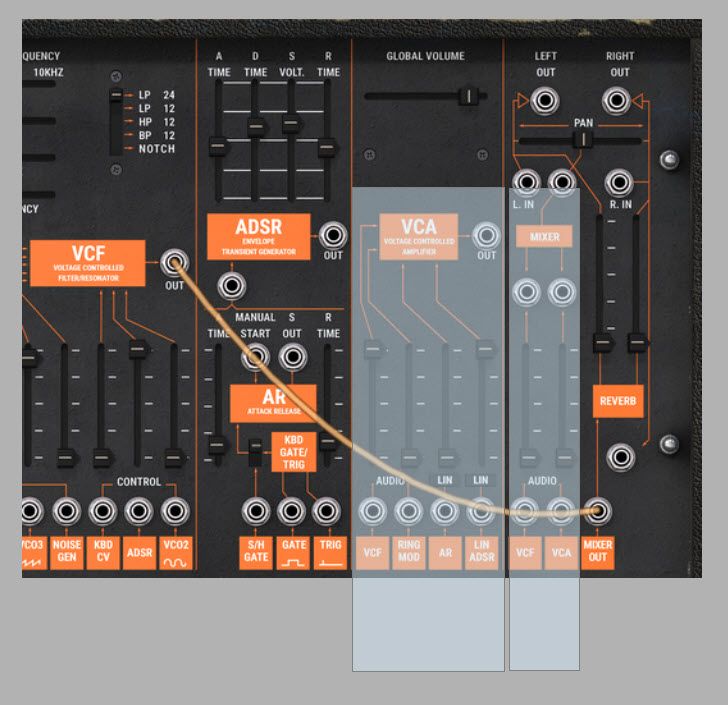
The reason is routing, not a mysterious property of reverb. The filter output has been patched directly to the reverb input, bypassing the usual output-mixer path. The reverb sliders therefore also act as level controls for the signal entering that route.
If we want to keep a similar sound without using reverb, we can remove the patch cable and restore the normal output path. Open the VCF slider in the output mixer and return the reverb sliders to zero.
The filtered sound should now reach the output through the regular mixer route.
This is a useful reminder that a control can serve an unintended secondary purpose when we route a signal through an unusual path. In the original patch, the reverb input sliders influence both the signal level and the amount of reverberation.
Step 8: Use the VCA for independent amplitude shaping
There is another way to modify the patch. Instead of sending the filter output directly to the reverb input, we can restore the VCA as the main audio path.
Fade out the VCF slider in the output mixer and bring up the VCA slider. Ensure that the filtered oscillator signal is fed into the VCA through the appropriate input path.
Now use the AR envelope generator to open and close the VCA with each note. The AR envelope has Attack and Release stages, allowing us to shape the amplitude independently of the filter envelope.
This gives us two separate time-based controls:
- The ADSR envelope shapes the filter cutoff and therefore the spectral evolution.
- The AR envelope shapes the amplitude and therefore the loudness contour.
We could use the ADSR envelope to control both, but the AR envelope gives us a separate Attack and Release setting for amplitude. For example, we can let the filter brighten quickly while the volume rises more slowly, or allow the volume to decay while the filter retains some brightness.
This separation between amplitude and timbre is central to expressive synthesizer programming.
What this patch teaches us
The “Trumpet and French Horn” patch is simple in terms of oscillator count and patch-cable complexity. Its value lies in the way it demonstrates several foundational concepts:
- A sawtooth waveform can provide a starting point for different brass-like timbres.
- A low-pass filter can change the apparent character of a sound by reducing its high-frequency content.
- A filter envelope changes the spectrum over time.
- A VCA envelope changes the amplitude over time.
- The audible result depends on the actual signal route through the instrument.
- A patched signal can bypass the normal output path and give a control an unexpected secondary role.
Most importantly, the patch demonstrates why understanding a synthesizer means understanding both its modules and the connections between them.
The ARP 2600 is not just a collection of oscillators, filters and envelopes. It is a system in which the same sound source can behave very differently depending on how those elements are connected.
That is exactly why analysing patches can teach us more than simply memorising the functions of individual controls.
Just click here to watch this patch analysis as a video on YoutTube.