
VCV Rack Kitchen Sink Explained: FM Synthesis, Wave Folding and Feedback
What does the Kitchen Sink oscillator in VCV Rack do, and how can you combine linear FM, through-zero FM, exponential FM, feedback and wave folding?
Introduction: One oscillator, many ways to shape sound
An oscillator is often presented as a relatively simple sound source: choose a waveform, set its pitch, and send its output to a filter or amplifier. The Kitchen Sink oscillator for VCV Rack invites a much more adventurous approach.
Kitchen Sink combines several methods of generating and transforming sound in a single module. It offers multiple basic and shaped waveforms, several forms of frequency modulation (FM), oscillator feedback, oscillator sync, and an onboard ADSR envelope generator. These functions can be used individually, but their real potential emerges when you combine them.
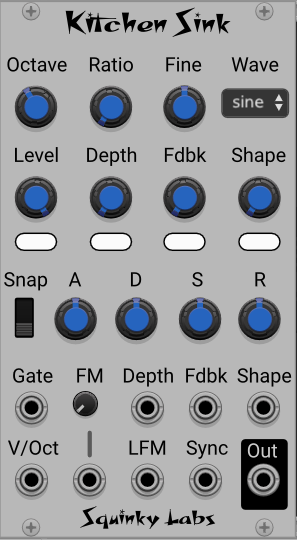
You can, for example, use through-zero linear FM while simultaneously applying oscillator feedback and wave folding. An envelope can control the FM depth, the folding amount, the feedback level, the output volume, or several of these parameters at once. External CV signals can contribute further movement.
The result is not simply a collection of separate sound-design options. It is an interconnected oscillator system in which several kinds of modulation can influence the same sound at the same time.
The available waveforms
Kitchen Sink offers several starting points for sound generation:
- Sine: a smooth, relatively pure starting waveform.
- Triangle: a waveform with a more pronounced harmonic structure than a sine wave.
- Saw: a harmonically rich waveform useful for everything from clear tones to dense, aggressive timbres.
- Morphed triangle-to-saw shapes: intermediate waveforms that let you explore the changing harmonic content between these two extremes.
- Folded sine: a sine wave transformed by wave folding, which can introduce additional harmonics and produce a more complex tone.
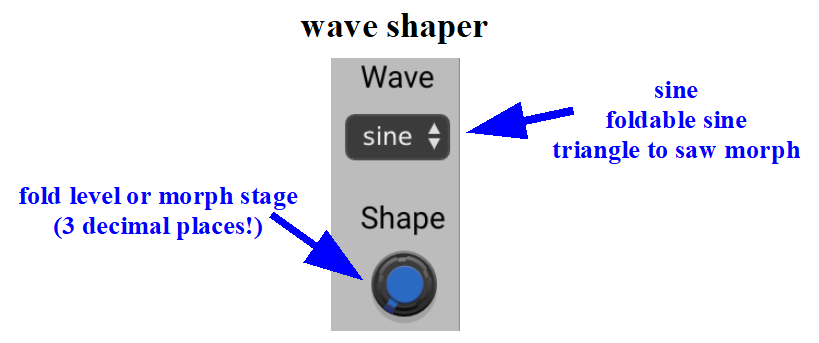
These waveforms provide different starting conditions for FM and feedback. A sine wave is useful when you want to hear the effects of modulation relatively clearly, while a saw or folded waveform can produce a much denser result.
Try changing the carrier waveform and the modulator waveform independently. Even when the pitch, FM depth and other settings remain unchanged, changing either waveform can transform the resulting spectrum.
Three approaches to frequency modulation
Kitchen Sink provides exponential FM, linear FM and linear through-zero FM. These are related techniques, but they do not behave identically.
Exponential FM
With exponential FM, the modulation signal changes oscillator frequency according to an exponential relationship. This makes the response dependent on the oscillator's current pitch and tuning conventions.
Exponential FM can be useful for animated, aggressive and pitch-oriented effects, but it can be harder to keep the relationship between the carrier pitch and the resulting spectrum consistent as you change notes.
Linear FM
Linear FM changes frequency according to a linear relationship with the modulation signal. It is especially useful when exploring the spectral effects of changing the modulation depth while keeping the carrier's nominal pitch stable.
In FM synthesis, the modulator's frequency and the strength of modulation both influence the resulting sound. The carrier is the oscillator whose output you hear, while the modulator is the signal that changes the carrier's instantaneous frequency.
Linear through-zero FM
Through-zero FM extends linear FM behaviour by allowing the oscillator's instantaneous frequency to pass through zero and become negative. This can produce a different response at high modulation depths from an implementation that cannot cross zero.
Through-zero FM is particularly interesting for experimental sound design because large modulation depths can produce complex, animated spectra without behaving exactly like ordinary pitch modulation.
The three FM modes are worth exploring separately before combining them. Start with a sine carrier, a sine modulator and a moderate modulation depth. Then compare the modes while changing the modulator frequency and depth.
Oscillator feedback and sync
Kitchen Sink also includes oscillator feedback and oscillator sync.
Oscillator feedback introduces a feedback path within the oscillator. As you increase the feedback amount, the waveform can become more complex and harmonically dense. The result depends on the oscillator's design, waveform and other settings, so feedback is best treated as a sound-shaping parameter to explore rather than as a simple brightness control.
Oscillator sync creates a relationship between oscillator cycles. Depending on the sync implementation and how the oscillator is driven, it can produce strong harmonic changes and sharp, animated timbres.
These functions can be combined with FM. For instance, you can use linear through-zero FM as the main source of spectral movement while applying feedback for additional complexity. You can also compare the result with sync enabled.
The important point is that you do not have to choose just one technique. Kitchen Sink lets you combine several of them at different strengths.
The onboard ADSR envelope
Kitchen Sink includes an ADSR envelope generator. Its output can be assigned to modulate:
- Output level.
- Linear FM modulation depth.
- Oscillator feedback.
- Wave-shaping amount.
Depending on the available assignment controls, you can direct the envelope to one destination, several destinations, or all of them.
This turns the envelope into more than a conventional amplitude contour. It can shape how the oscillator's timbre develops over the duration of a note.
For example, an envelope might open the sound by increasing FM depth during the attack, introduce additional feedback during the decay, and then reduce both effects as the note fades. Alternatively, you can use the envelope mainly for amplitude and let external CV sources animate the timbre.
Kitchen Sink also provides a three-position snap setting: no snap, snap strength 1 and snap strength 2. Experiment with these settings to hear how the envelope's response changes, particularly when it controls parameters that have a strong effect on timbre.
Three ways to control a parameter
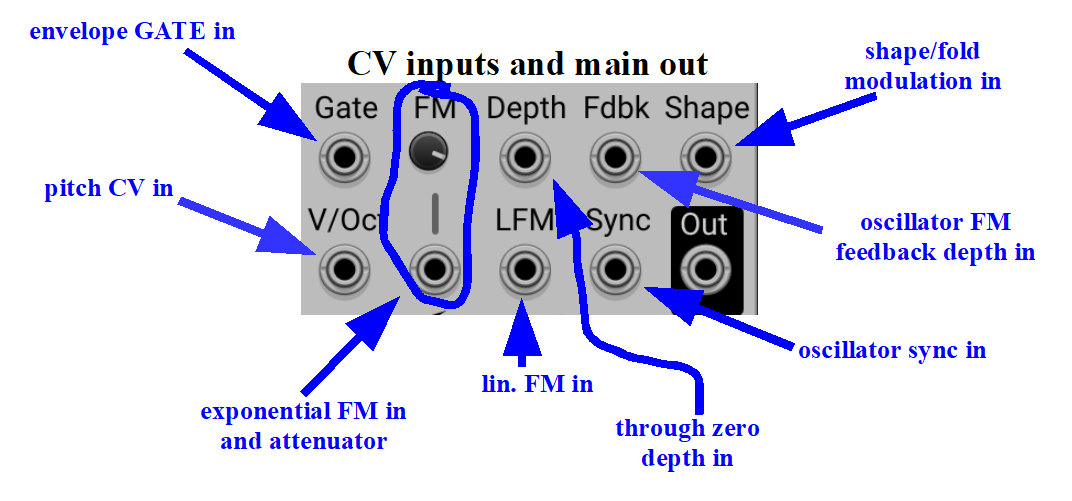
One particularly useful aspect of Kitchen Sink is that its Level, Depth, Feedback and Shape parameters can be influenced through three routes:
- The manual control: set the parameter's basic value with its knob.
- The onboard envelope: create a contour that changes the parameter over time.
- The CV input: use an external modulation source, such as an LFO, sequencer or random voltage generator.
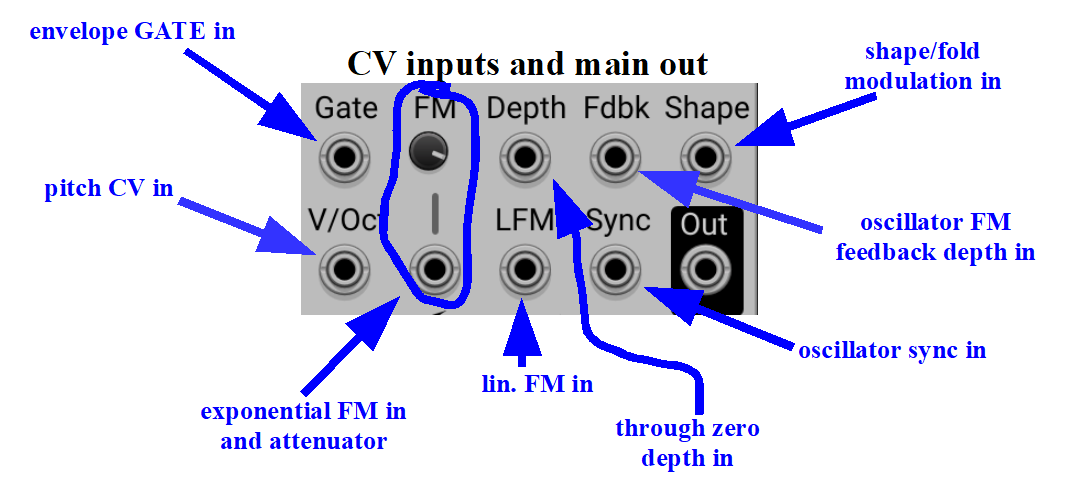
These controls work together. The manual setting establishes a starting point, while the envelope and external CV contribute further modulation. The precise result depends on the module's response and the signals you feed into it.
This makes Kitchen Sink well suited to patches where a sound must remain recognizable while continuously changing in detail.
Setting the carrier-to-modulator ratio
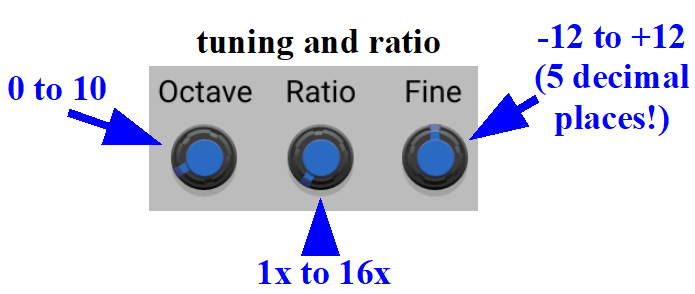
Kitchen Sink provides a convenient ratio control that changes the carrier-to-modulator (C) relationship in integer steps from 1× to 16×. The octave and fine-tuning controls let you move beyond those integer ratios when you need a different frequency relationship.
In practical FM patching, the ratio between carrier and modulator frequencies has a major influence on the resulting spectrum. Simple frequency relationships often produce more obviously harmonic results, while other relationships can lead to more complex or inharmonic spectra.
The ratio control is intended to make broad changes to the relationship without requiring you to retune the basic oscillators manually each time. For more experimental work, combine it with octave and fine-tuning adjustments, then listen to how the spectrum changes.
Connecting two Kitchen Sink modules
A particularly convenient feature is available when two Kitchen Sink modules are placed next to each other.
The right-hand module's context menu offers a Hookup Modulator option. Selecting it makes the left-hand Kitchen Sink operate as the FM modulator for the right-hand Kitchen Sink, which becomes the carrier.
This arrangement provides a straightforward way to create a two-oscillator FM voice without building the entire connection manually.
You can still experiment with different waveforms, envelopes and modulation settings on both modules. Remember that the modulator is not merely an auxiliary sound source: its waveform and frequency relationship directly affect the carrier's resulting timbre.
A practical starting point
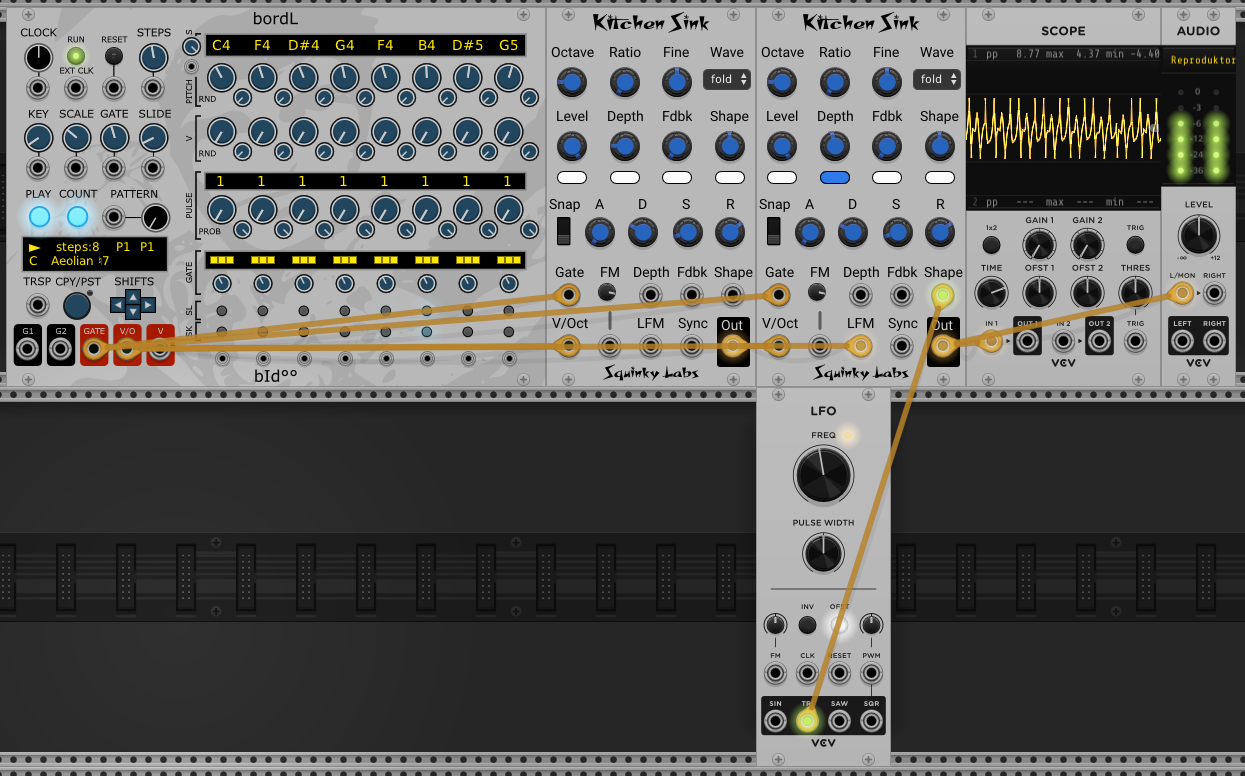
For your first Kitchen Sink experiment, use two modules and a sequencer.
- Send the sequencer's pitch CV to both modules.
- Set the left module as the modulator and the right module as the carrier.
- Start with sine waves on both oscillators.
- Select linear through-zero FM on the carrier.
- Use the carrier's envelope to control FM depth.
- Listen at a modest depth before gradually increasing it.
- Change the modulator waveform, then try wave folding on the carrier.
- Finally, introduce feedback and compare the results.
Once you understand how each element affects the sound, use the same patch as a platform for more complex combinations.
Conclusion
Kitchen Sink is a versatile VCV Rack oscillator for anyone who wants to explore FM beyond a basic carrier-and-modulator arrangement. Its combination of three FM approaches, waveform morphing, wave folding, feedback, sync, envelope assignment and external CV makes it possible to build highly animated sounds without separating every process into a different module.
The best way to learn it is to change one parameter at a time, listen carefully, and then gradually combine techniques. The module becomes particularly rewarding when the envelope and external modulation sources shape not only the sound's volume but also its underlying spectral behaviour.