
VCV Rack Pigeon Plink Explained: FM Ratios, CV Control and Sound Design
How does Pigeon Plink's continuous carrier-to-modulator ratio control work, and how can it be used for experimental FM synthesis in VCV Rack?
Introduction
Pigeon Plink is an FM-oriented oscillator for VCV Rack based on Kitchen Sink. The two modules share much of the same general approach to sound generation and modulation, but Pigeon Plink makes one particularly important change: its carrier-to-modulator ratio control is far more flexible.
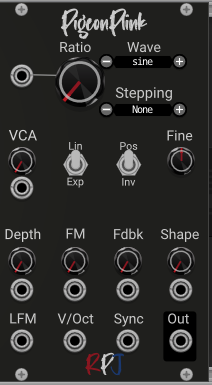
Kitchen Sink uses a ratio control based on integer steps, with octave and fine-tuning controls available for additional adjustments. Pigeon Plink replaces this arrangement with a ratio control that can cover values from 0 to 32, with precision to six decimal places when the stepping mode is set to None.
This seemingly small difference opens up a broad range of possibilities. You can explore conventional FM ratios, subtle detuning, subharmonic relationships, unusual spectral structures and extremely low ratios that would be cumbersome to set up using separate tuning controls.
Pigeon Plink also offers selectable ratio-stepping schemes, CV control of the ratio, and a built-in VCA with adjustable response. The result is an oscillator designed for both precise experimentation and continuously evolving patches.
What is the carrier-to-modulator ratio?
In an FM patch, the carrier is the oscillator whose output forms the main audible signal, while the modulator changes the carrier's instantaneous frequency.
The relationship between their frequencies strongly influences the sound's spectrum. If the carrier frequency is (f_c) and the modulator frequency is (f_m), their ratio can be expressed as:
[
R = \frac{f_c}{f_m}
]
A ratio of 1 means that the two frequencies are equal. A ratio of 2 means that the carrier frequency is twice the modulator frequency. A ratio below 1 means that the carrier frequency is lower than the modulator frequency.
In conventional FM sound design, simple ratios are often useful starting points because they can produce relatively clear, harmonically related spectra. More unusual ratios can create more complex relationships between the partials. The actual result also depends on modulation depth, oscillator waveforms and the FM implementation.
Pigeon Plink lets you explore these relationships directly with its Ratio control.
A continuous ratio from 0 to 32
With the stepping mode set to None, Pigeon Plink's Ratio control provides values from 0 to 32 with six decimal places of precision.
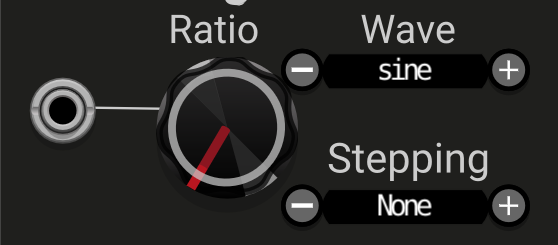
This lets you dial in values such as 1.5, 2.375 or 7.123456 without being restricted to integer ratios or predefined steps. You can also modulate the Ratio parameter using CV, allowing the carrier-to-modulator relationship to evolve over time.
This is useful for several kinds of sound design:
- Stable tonal FM: choose a fixed ratio and explore the effect of modulation depth.
- Slowly changing timbres: use an LFO to move the ratio over a range.
- Stepped spectral changes: use sample-and-hold or sequenced CV to jump between ratio values.
- Unstable or inharmonic textures: allow the ratio to move through less conventional relationships.
- Generative sounds: combine CV-controlled ratio changes with pitch sequences and envelopes.
A continuous ratio does not automatically mean a better sound. Its value lies in the ability to choose a specific relationship or explore the transitions between relationships.
Why a ratio of zero is interesting
A Ratio setting of 0 means that the carrier's nominal frequency is zero relative to the modulator's frequency.
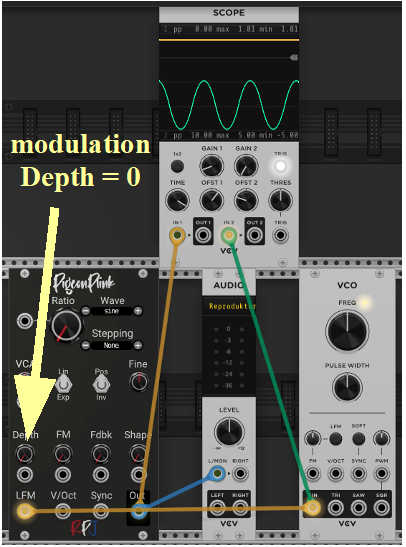
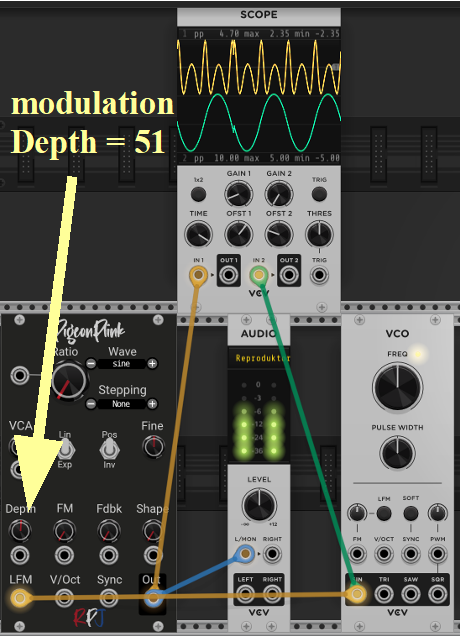
With linear FM depth at zero, there is no modulation to move the carrier away from its zero-frequency setting, so you should not expect an ordinary pitched oscillator tone. When you increase linear FM depth, however, the modulating signal can change the carrier's instantaneous frequency and produce an audible output.
This is an intriguing starting point for experimentation. Instead of beginning with a normally pitched carrier and adding modulation, you can begin at zero and explore how the modulator creates movement from that setting.
The resulting sound depends on the modulation signal, depth and oscillator implementation. Try a sine-wave modulator first, then compare it with triangle, saw and other available waveforms.
At very low ratio settings, small parameter changes can have a pronounced effect on the sound. Move the control slowly and listen for transitions rather than assuming that a ratio below 1 is simply a quieter or lower-pitched version of a conventional FM tone.
Six ratio-stepping modes
Pigeon Plink provides several ways of constraining the Ratio control. These modes are useful when you want to explore familiar sets of ratios without having to dial in every value manually.
| Stepping mode | Available values or behaviour |
|---|---|
| None | Continuous values from 0 to 32, with six decimal places of precision |
| Legacy | Values from 0 to 32 |
| Legacy+Sub | 0.125, 0.25, 0.5 and integer values from 1 to 32 |
| Octaves | 0.125, 0.25, 0.5, 1, 2, 4, 8, 16 and 32 |
| Digitone | A stepping scheme modelled on the Elektron Digitone |
| DX11 | A stepping scheme modelled on Yamaha's DX11 |
| DX7 | A stepping scheme modelled on Yamaha's DX7 |
The Digitone, DX11 and DX7 options provide familiar sets of ratios associated with those instruments. They are useful starting points for exploring different FM approaches, although the ratio choices alone do not reproduce the full sound or architecture of those synthesizers.
The Octaves mode is particularly convenient when you want to move through simple octave-related relationships. Legacy+Sub adds common sub-ratio values while retaining integer values.
Regardless of the selected stepping mode, the Ratio parameter can also be modulated by CV. This allows an LFO, sample-and-hold circuit, sequencer or other modulation source to influence the ratio during playback.
Pigeon Plink's user manual, available through its right-click menu, also provides guidance for users interested in creating their own ratio-stepping schemes.
The built-in VCA
Pigeon Plink includes a VCA section that controls the module's output level. Its response can be switched between linear and exponential.
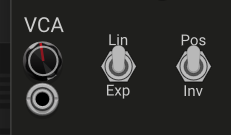
The difference matters when you use a CV signal to control amplitude. A linear response produces a proportional relationship between the control signal and the resulting level, while an exponential response changes that relationship to provide a different amplitude contour.
Neither mode is universally better. The most useful choice depends on the control signal and the behaviour you want. Compare both responses with an ADSR envelope, particularly when shaping percussive sounds or smoother sustained tones.
The VCA also includes a Pos/Inv switch. This determines whether the signal entering the VCA modulation input is used in its original polarity or inverted before it affects the modulation behaviour.
This can be useful when a modulation signal produces the opposite movement from what you intended. Rather than rebuilding the patch, you can try inverting the control signal at this point.
Fine tuning
The Fine Tune control next to the VCA provides an overall pitch adjustment spanning one octave down to one octave up, or ±12 semitones.
This is useful for making small tuning adjustments or exploring more pronounced pitch relationships between two Pigeon Plink modules.
When working with FM, remember that changing the carrier pitch and changing the carrier-to-modulator ratio are related but different operations. Fine tuning adjusts pitch, while the Ratio control changes the frequency relationship between carrier and modulator. Experiment with each separately before combining them.
Three practical uses for ratio modulation
1. Slowly evolving FM
Patch an LFO to the Ratio CV input and use a suitable attenuator or VCA to control the modulation amount. Begin with a slow LFO and a modest range.
The result can be a slowly changing tone whose spectral character evolves over time. Try a continuous ratio setting first, then compare it with Octaves or another stepping mode.
2. Stepped ratio changes
Use a sample-and-hold module to generate changing CV values, and patch its output to the Ratio CV input. Use an LFO or clocked source to trigger the sample-and-hold.
With an appropriate range and attenuation, the ratio changes become a sequence of different FM relationships. You can keep the carrier pitch fixed to focus on timbre, or combine the ratio changes with a pitch sequence.
3. Ratio and depth moving together
Patch the same modulation source to both Ratio and linear FM Depth, using separate attenuation where possible.
Now the changing frequency relationship and the changing strength of modulation interact. A single LFO can produce a much more complex result than it would by controlling only one parameter.
Try this with a unipolar LFO signal if you want the modulation to remain on one side of its range. In the original Signal Path examples, the LFO's Offset control is enabled to provide unipolar output.
Conclusion
Pigeon Plink's main attraction is its flexible carrier-to-modulator ratio control. The continuous range makes it possible to explore precise ratios, unusual frequency relationships and dynamic transitions that would be difficult to achieve with a control restricted to integer values.
The additional stepping modes make the module approachable even if you prefer to work with a smaller set of familiar values. CV control extends the Ratio parameter into the wider modular patch, where it can become part of a sequenced or generative sound-design system.
Begin with a fixed ratio and a modest amount of linear FM. Then introduce ratio modulation, experiment with the stepping modes, and finally combine the ratio changes with envelopes, amplitude control and other forms of modulation.