
Voltage Modular Zeroscillator Patches: Four FM and Morphing Experiments
How can you patch the Voltage Modular Zeroscillator for basic FM, through-zero effects, morphing and complex two-oscillator sounds?
Patch Lab: Four Voltage Modular Zeroscillator Experiments
The Voltage Modular Zeroscillator is an excellent playground for experimenting with frequency modulation, wave morphing and unusual phase relationships. Its many controls can look intimidating at first, but the best way to understand them is to build a few patches and change one parameter at a time.
The four experiments in this article begin with a straightforward FM sound and gradually introduce more complex modulation. The patches were included in the original Signal Path issue's downloads under the names given below.
If you haven't explored the module's inputs and controls yet, start with The Voltage Modular Zeroscillator Explained: FM, Through-Zero FM and Wave Morphing.
Patch 1: Basic FM with envelope control
Preset: zeroscillator 2 basic FM
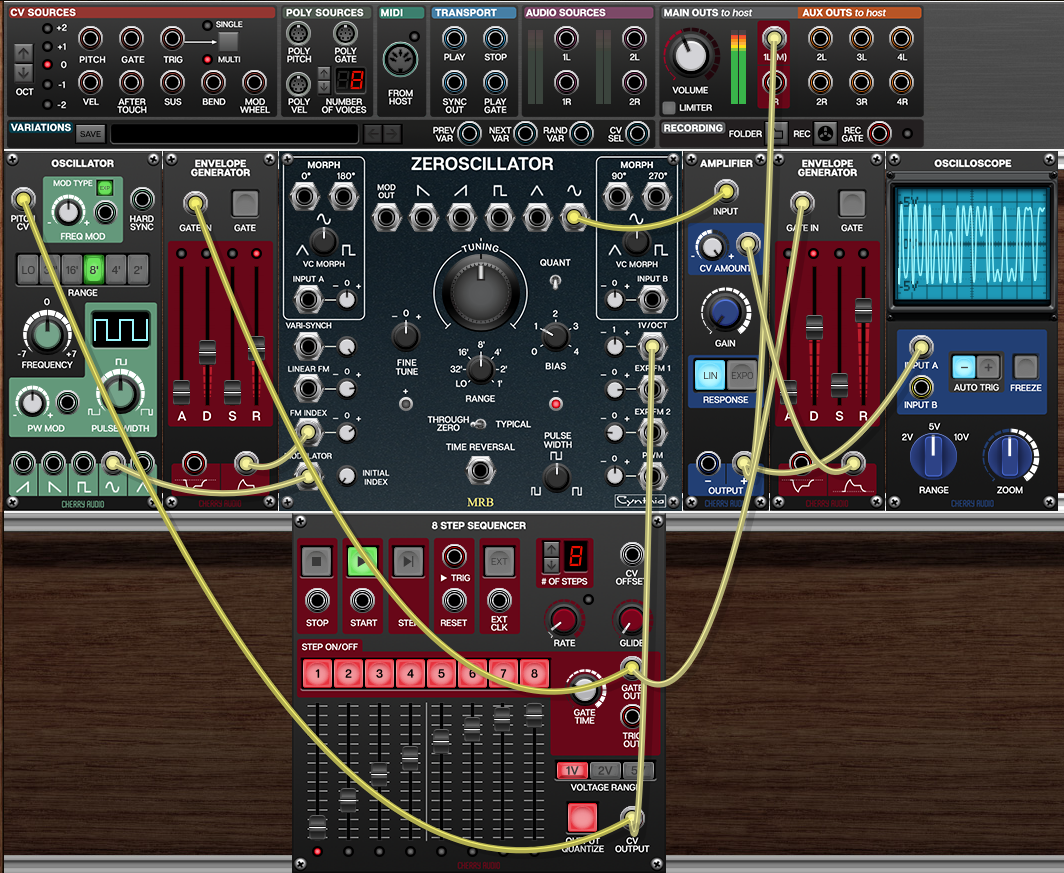
This first patch is a good starting point because it allows you to hear how modulation depth, oscillator tuning and through-zero operation affect the sound.
The basic idea is to use one oscillator as the modulator and another as the sound source. Envelopes control the modulation strength and the overall amplitude, so the timbre evolves over the duration of each note.
How to explore the patch
- Load the preset and play a few notes.
- Adjust the envelopes controlling the modulation depth and overall volume.
- Switch between THROUGH ZERO and TYPICAL modes.
- Change the BIAS setting and listen to how the oscillator behaves.
- Adjust the modulator's frequency.
- Try different tuning relationships between the modulator and the oscillator being modulated.
The goal is to hear how the same basic patch can produce different results as the modulation changes over time.
Try TIME REVERSAL
Now patch the modulating oscillator's square wave into the Zeroscillator's TIME REVERSAL input.
Listen to the transitions, then replace the square wave with a sawtooth or ramp waveform. Each shape produces a different control pattern, so the oscillator's forward and reverse motion will behave differently.
Experiment with both the modulation rate and the amount of signal reaching TIME REVERSAL. If the effect is too abrupt or too subtle, adjust the modulator frequency or attenuator settings.
Add quantized tuning
Enable the Zeroscillator's QUANT function using the switch beside the main tuning control.
Try tuning the oscillator seven semitones down from your starting pitch. This gives you a useful musical interval to work with, although the perceived result will still depend on the modulator's frequency and modulation depth.
Now try other intervals and compare the resulting spectra. Some tuning relationships produce a more recognisable harmonic quality, while others create more complex or metallic timbres.
Once you are comfortable with the basic patch, add PWM or wave morphing. Change only one feature at a time so that you can hear what each function contributes.
Patch 2: Morphing controls linear FM
Preset: zeroscillator 1 morphing and lin FM
This patch combines two Zeroscillators. The left oscillator changes its waveform using the MORPH function, and its outputs are used to modulate the right oscillator.
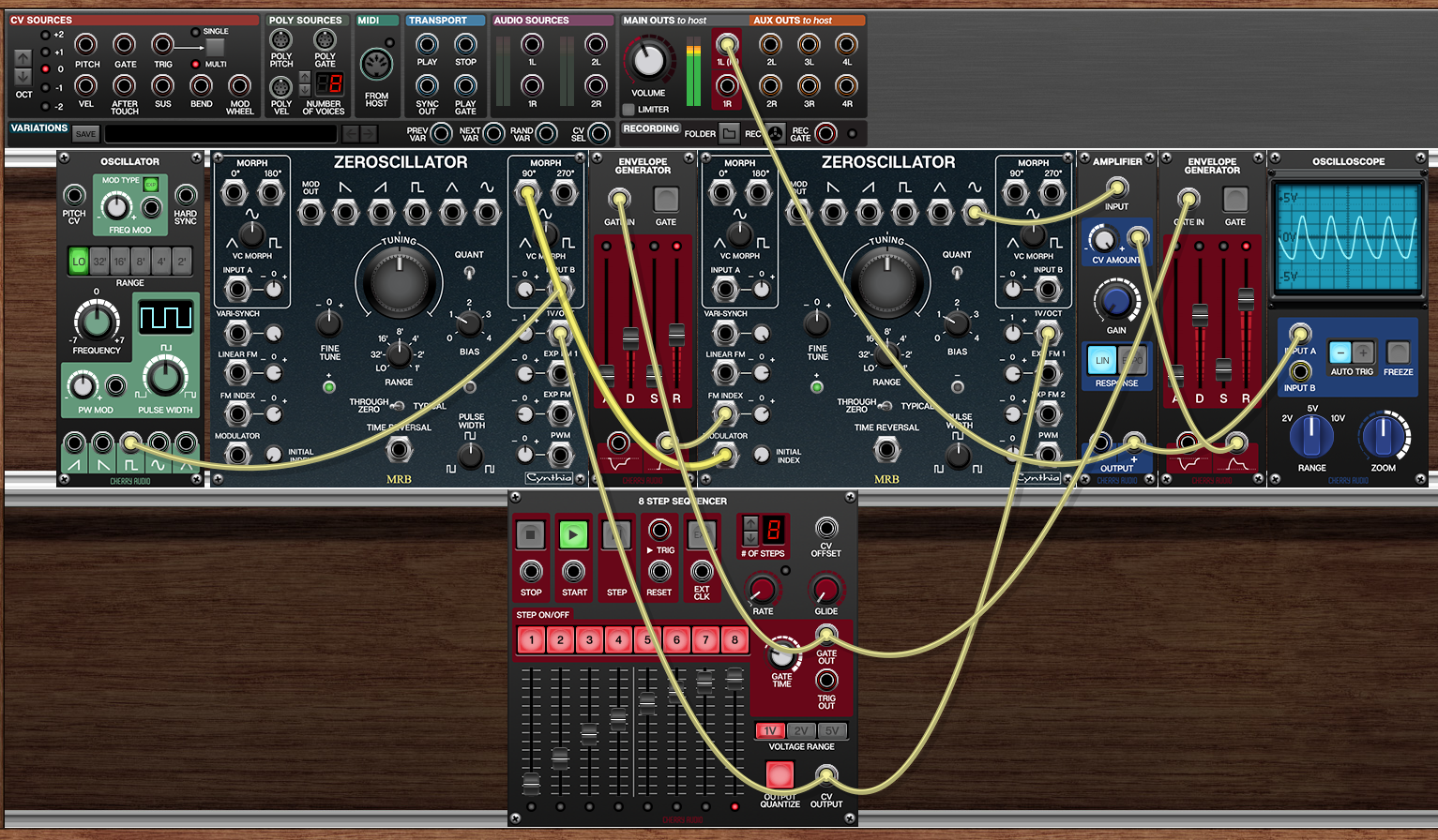
The key idea is that the modulating waveform itself changes over time. This means the signal affecting the right oscillator is not simply a fixed sine, triangle or square wave.
Signal routing
- Use the oscillator on the left to modulate the left Zeroscillator's MORPH input.
- Patch the left Zeroscillator's 0° morph output into the right Zeroscillator's MODULATOR input.
- Patch the left Zeroscillator's 180° morph output into the right Zeroscillator's FM INDEX input.
The first connection supplies the modulating waveform. The second makes the strength of that modulation change in relation to the phase-related output.
Because the two morph outputs have different phase angles, the FM INDEX control receives a signal that is related to, but not identical in phase to, the signal reaching MODULATOR.
What to listen for
Start with a slow morphing rate. Then increase it gradually.
Notice that the sound of the right oscillator changes as the left oscillator moves through different waveform shapes. The result is not simply a conventional FM sound with a fixed modulator: the harmonic structure of the modulation signal and its effective depth are both changing.
Now try different phase outputs for MODULATOR and FM INDEX. Listen carefully to how the timing relationship between the modulation signal and modulation depth affects the result.
This patch is particularly useful for exploring the relationship between waveform shape, modulation depth and the spectrum of an FM sound.
Patch 3: Two Zeroscillators for an animated attack
Preset: zeroscillator 3 two zeroscillators
This patch also uses two Zeroscillators, but its main effect is an expressive, whip-like attack at the beginning of each note.
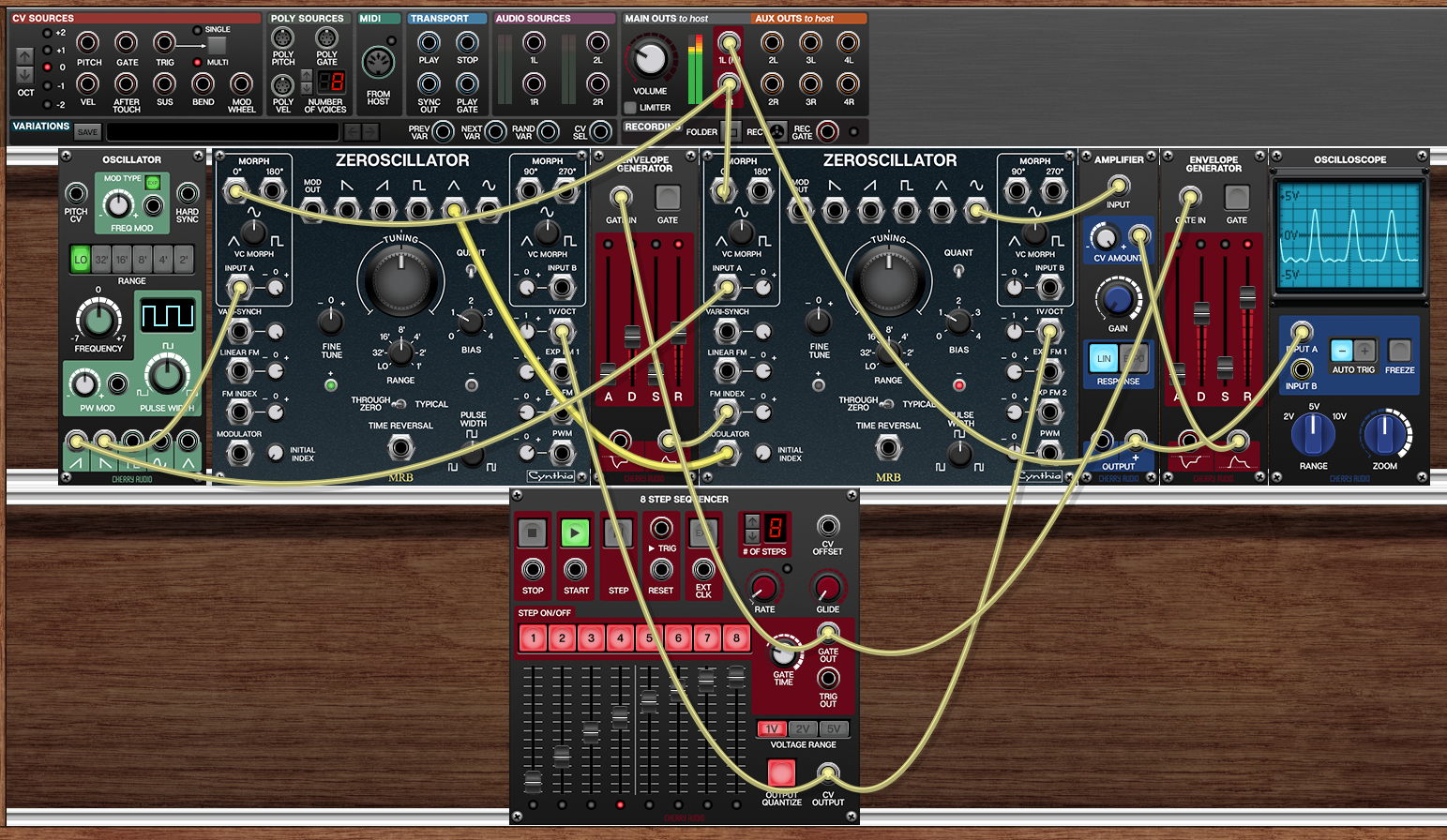
The left Zeroscillator acts as the modulator for the right Zeroscillator. Its MORPH output is used as the FM signal, while the left oscillator's waveform morphing is controlled by the square wave from the separate OSCILLATOR module.
How to explore it
- Load the preset and trigger a note.
- Listen to the attack before concentrating on the sustained part of the sound.
- Adjust the square-wave modulation controlling the left Zeroscillator's MORPH input.
- Change the modulator frequency and the amount of FM reaching the right oscillator.
- Try different morphing ranges and envelope settings.
The initial transient is an important part of the sound. It is produced by the interaction between the changing modulation waveform and the right oscillator's response to that signal.
You can make the result more percussive, more metallic or more aggressive by changing the modulation depth and envelope behaviour.
For an additional experiment, compare the sound when the left Zeroscillator's morph position changes quickly with the sound produced by a slower transition. A rapidly changing modulator can create a more dramatic attack, while slower morphing can produce a more gradual timbral evolution.
Patch 4: Two Zeroscillators with stereo morphing
Preset: zeroscillator 4 two zeroscillators morphing
This final patch combines two Zeroscillators with multiple morphing signals and stereo routing.
The left Zeroscillator modulates the right Zeroscillator, and its morphing output is also sent to the right audio channel. The right Zeroscillator contributes to both sides of the stereo image: its main oscillator output is routed to the left channel, while its morphing output is routed to the right channel.
The MORPH functions of both Zeroscillators are modulated by the separate OSCILLATOR module.
- The left Zeroscillator's MORPH input receives a down-saw waveform.
- The right Zeroscillator's MORPH input receives an up-saw waveform.
The two morphing functions therefore move in different directions through their waveform ranges.
Let the patch run
Unlike a short percussive patch, this one benefits from a longer listening session.
Allow the modulation to run for a while and listen for rhythmic patterns that emerge from the interaction of the two changing waveforms. The modulation may create repeating or evolving accents even when you are not programming a conventional rhythmic sequence.
The stereo routing adds another dimension. The signals are related, but they are not identical, and their evolving harmonic content can make the stereo image feel more animated.
Try changing the oscillator tuning, morphing ranges and modulation rate. You can also experiment with additional processing, but begin with the unprocessed patch so you can understand what the Zeroscillators themselves are doing.
Beyond the four presets
These patches are starting points rather than finished recipes. Their real value lies in the relationships they reveal between modulation signals, modulation depth, waveform shape and phase.
Here are a few more experiments to try:
- Use a different waveform as the FM source.
- Modulate FM INDEX with an envelope, LFO or another oscillator.
- Compare conventional linear FM with through-zero FM.
- Change the interval between the two oscillators.
- Use different phase-related morph outputs.
- Introduce PWM while FM is active.
- Let the morphing or modulation rate change slowly over several minutes.
For generative music, try keeping the pitch sequence relatively simple while allowing modulation depth and waveform shape to evolve independently. This can create a sound that changes continuously without losing its musical grounding.
Further learning
For a detailed introduction to the module's controls, see The Voltage Modular Zeroscillator Explained: FM, Through-Zero FM and Wave Morphing.
I also made a nearly two-hour video about the Zeroscillator, including further patch examples and a more extensive explanation of frequency modulation:
Watch my Zeroscillator and FM synthesis video on YouTube
The next step is to understand the theory behind the sounds. In particular, the differences between linear FM, exponential FM and through-zero FM help explain why the same modulating waveform can produce very different results depending on how it is applied.